Pick the workflow on volume
How often it happens, how long it takes and what a mistake costs decide it. The best demo rarely wins.
Weighs
- how often
- how long
- what an error costs

AI EngineeringAgents & Agentic Workflows
Your team has workflows that need to be repeated every day. We build agents to handle that work reliably, with engineers who map the workflow, build and secure the agent, and keep it running in production.
Start with an Agent Opportunity Blueprint · 1 week · $8K–$15KTeams We've Built For







































Most teams come to us with a list of workflows, a pilot, or an agent that’s already running. Each needs a different first step.
The workflow may have been picked for how well it demoed. If not enough volume runs through it, there’s no return to show at budget time. Our Agent Opportunity Blueprint programme scores your candidates and gives a go or no-go on each, including any we’d advise against.
It may have no approval step, no way to escalate and no record of what it touched, so nobody will let it write to a real system. Our Agent Scale Launch programme builds those in, and a Security Review gives your review board the evidence it needs.
When a model changes or a supplier redesigns its portal, the agent can keep running and quietly get things wrong. Without a trace of each run or a baseline to test against, you won’t see it happen.
Your own engineers, the RPA platform you already own and your vendors’ agents each suit some workflows. None of them fits one that crosses four systems, touches money or a patient and has to explain itself afterwards. The table below shows where each route stops.
Putting an agent to work on a real process takes five stages, in the order they happen. You pick the right workflow, build the agent, connect it to your systems, make it safe to give access, and keep it running.
| Stage | What it is | Where you start |
|---|---|---|
| 1 · Find the workflow worth automating | Map how the work is done today, score candidates on volume, handling time and error cost, and model the ROI of the top three, with a go or no-go on each, including any we'd advise against. | Agent Opportunity Blueprint: 1 week, $8K–$15K. |
| 2 · Build the agent | Single agents for sales, operations, service, research and finance. Multi-agent systems with a supervisor handing work to specialists. Deep agents that plan, hold state across hundreds of steps and run for hours. Computer-use agents for systems with no API. | Agent Prototype Sprint: 2–3 weeks, $25K–$45K. Production: Agent Scale Launch: 6–12 weeks, $80K–$200K. |
| 3 · Give it tools and memory | Custom MCP servers into your EHR, policy administration, ERP, CRM or data warehouse, with errors an agent can recover from. A gateway that authenticates, logs and costs every tool call, and memory that remembers an account, not just a conversation. | Inside every build above. Not sold separately, see the note below. |
| 4 · Make it safe to give system access | Prompt injection defence, short-lived scoped credentials for each agent, sandboxed execution, rate and volume limits so small permitted actions can't add up to a big unintended one, risk-tiered approval gates, and an append-only record of every tool call, retrieval and output. | Inside every build above. Also sold on its own, for agents you already run: a threat model and a rated assessment across all six areas, with a remediation plan written for a review board and not for engineers. |
| 5 · Keep it running | Agents degrade quietly, so we trace every run, cluster failures, track cost per workflow and per customer, manage the migration when a provider retires a model, and run regression evaluation before any cutover. | Scoped on the call. It runs as an ongoing monthly service once your agent is live. |
Six steps, in this order. Most teams could read this list and carry it out. What takes longer to learn is which step your workflow makes hard.
How often it happens, how long it takes and what a mistake costs decide it. The best demo rarely wins.
Weighs
It gets its own account in your identity system, and you offboard it the way you’d offboard a person.
Includes
Anything that can’t be undone, or that leaves a record someone will read later, waits for a named approver.
Includes
can’t be undone, or that leaves a record
waits for a named approver
An agent will eventually read something written to manipulate it, so the design assumes it will. When the agent can’t verify a request, it stops and asks.
Includes
can’t verify a request
stops and asks
Every run is traced, so a change shows up as a number before it shows up as a complaint.
Measures
Every run is traced
Before go-live we size the exception queue, name who owns it and say what it takes from their week.
Includes
day 91
When you're deciding who will build and run an agent, the specific tools matter, so we name them.
We hold Google Cloud and AWS partnerships. We're not a reseller for any model provider or framework vendor, which is why we can tell you when the cheaper model, or no agent at all, is the right answer.
Three projects from the services above, with the problem each one started from and what changed.
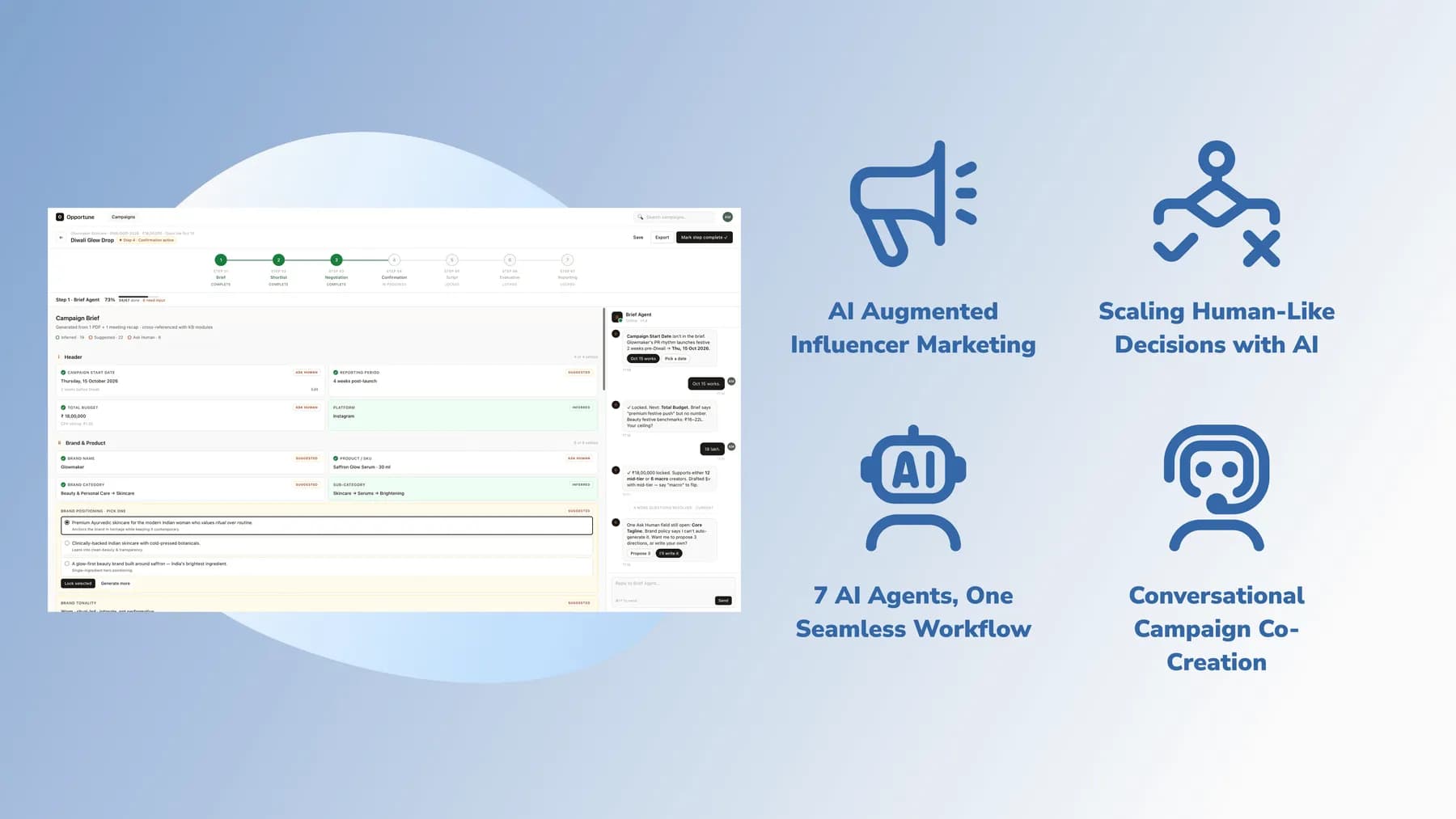 AI Engineering · India
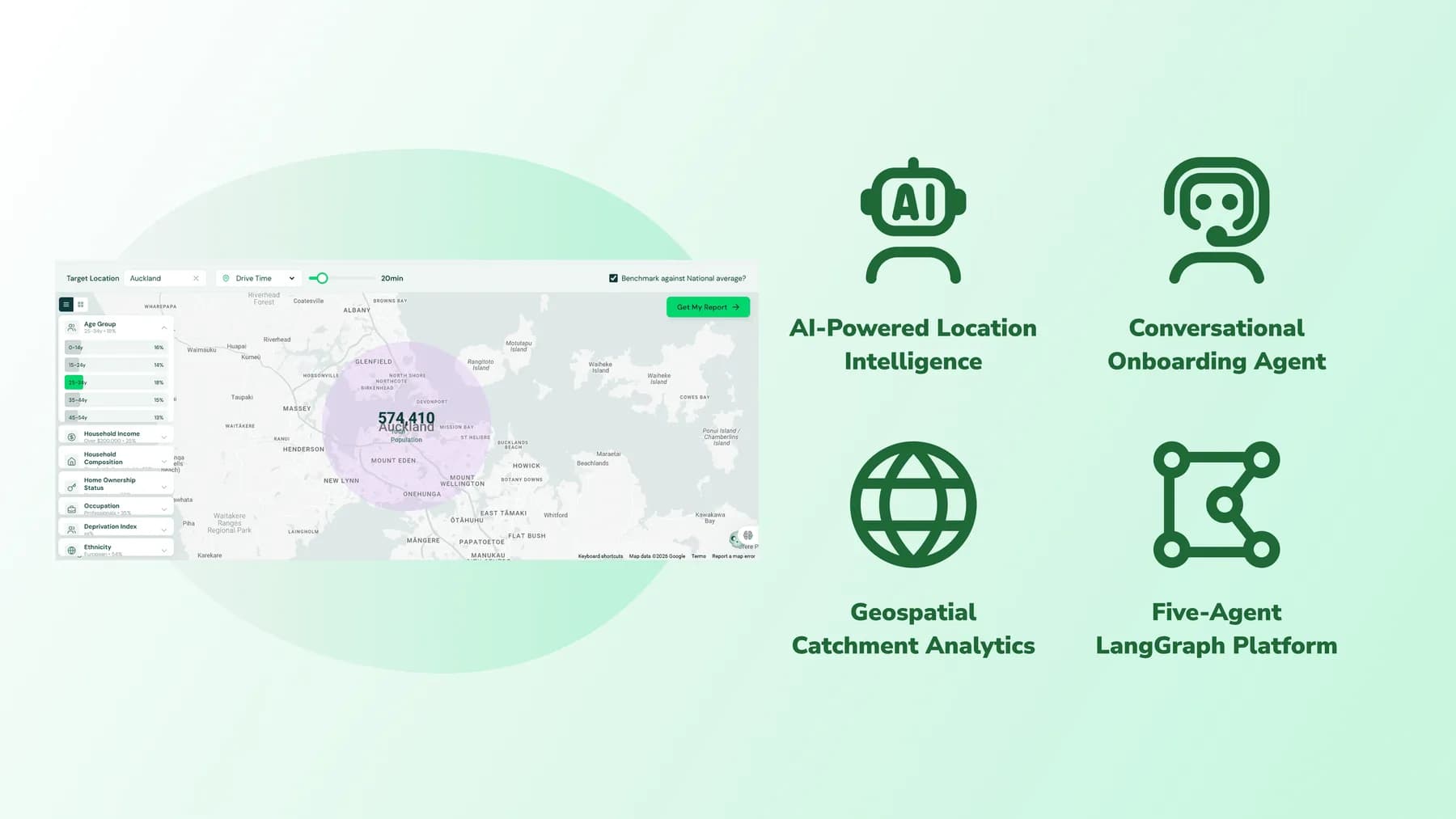 AI Engineering · New Zealand
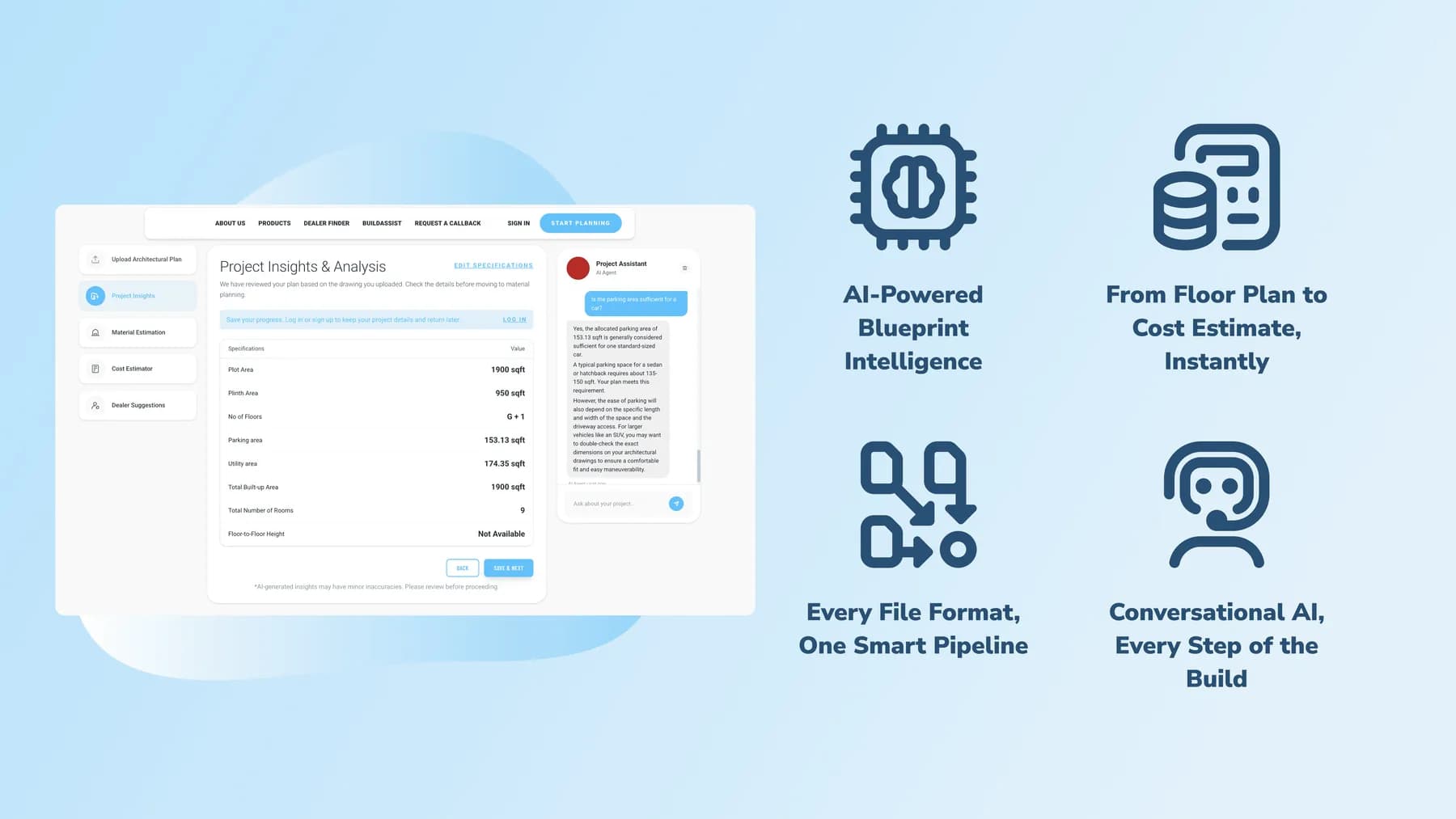 AI Engineering · India
The engineering is the same in every industry, but the systems that hold the data, the actions that are hard to unpick and the people entitled to examine a decision afterwards all change.





The main difference is how they fail. An RPA script follows a recorded path and breaks when the path changes: a moved button, a renamed field, a new dialog. An agent reads the screen or the data, decides what to do, and can handle the case nobody recorded. A practical test is how much of your automation team’s time goes on maintaining scripts instead of building new ones. Where RPA is working, leave it. We’re usually replacing the small number of scripts that take a disproportionate share of that time, and interface change is only one reason a script ends up in that group, alongside data-format changes, credential rotation and environment failures.
It depends on the workflow, and each route has a point where it stops. Your own engineers on a framework like LangGraph work well for one workflow in one system, but get harder at the second workflow, the security review and the day a provider retires a model. The RPA platform you already own suits high-volume, deterministic work on interfaces that don’t change, and it’s cheaper per run and easier to audit than an agent. Your software vendors’ own agents are the right choice for work that lives entirely inside one of their products. An agent engineering partner makes sense for workflows that cross several systems, take actions that are hard to unpick and must be explainable afterwards. BigStep’s one-week Agent Opportunity Blueprint checks which route fits your workflow, and it will tell you when the answer is one of the first three.
It depends on what the agent has to do. The main cost drivers are how many systems it connects to, how many actions it can take on its own, how strict the approval and audit requirements are, and whether it has to run for hours across hundreds of steps. BigStep publishes its prices by stage: an Agent Opportunity Blueprint to pick the workflow (1 week, $8K to $15K), an Agent Prototype Sprint (2 to 3 weeks, $25K to $45K), and an Agent Scale Launch for a production system (6 to 12 weeks, $80K to $200K). Keeping it running afterwards through managed services starts from $5,000 a month.
Every action an agent can take is tiered by whether it can be reversed. The ones that can’t, like a payment, a regulatory filing, a clinical note or a message to your customer, wait for a named human approver. Confidence thresholds can escalate more cases on top of that, but the approval gate is the control, and it’s enforced in the tool layer instead of only being asked for in the prompt, so it holds even when the model behaves unexpectedly. BigStep sorts every action by whether it can be undone and whether it leaves a record someone will read later, and you decide where those lines sit.
Prompt injection is when text an agent reads, such as a document, an email or a supplier’s portal, contains instructions written to steer it. It’s the main security problem with agents, and it’s different from the one your application security team already handles: an agent with tool access is an authenticated actor that text nobody at your company wrote can steer. The defences are structural. Retrieved content is kept separate from instructions, the agent’s actions are limited to what the workflow needs, credentials are scoped so an injected instruction can’t reach data the agent has no business touching, outbound traffic is limited to an allow-list, and anything that triggers an action is validated, not trusted. BigStep tests this before go-live and again whenever the model changes.
Yes, and systems with no API are the normal case in enterprise operations. A computer-use agent is an AI agent that operates a browser or a desktop application the way a person does, reading the interface and reasoning about it instead of following recorded coordinates. That reaches payer portals, carrier platforms, government filing sites and thick-client legacy applications that integrations can’t touch. It runs in a sandboxed environment, checks visually that the action it took is the action that happened, and records every run so it can be replayed step by step when someone needs to check it. Where a system is already automated reliably, such as a mature RPA estate against an interface that doesn’t change, leave it alone. This is for the systems nobody has managed to automate, or where the automation keeps breaking, and it’s what BigStep’s computer-use agents are built for.
More often than most people expect. If the work is high volume and genuinely deterministic, a script is cheaper, faster and easier to audit. If it happens four times a month, the return won’t cover the engineering. If nobody can describe how the work is done today, the problem is the process and not the automation, and an agent will encode the confusion. The Agent Opportunity Blueprint exists to find these out in a week for $8K to $15K, and telling you not to build something is a valid outcome of it.
An agentic workflow is a business process in which an AI agent, a system that decides what to do next instead of following a fixed script, carries out several steps on its own. It uses tools to read and write in real systems, and it stops for a human where the rules say it must. AgentOps is what keeps one working after launch: tracing every run, clustering failures instead of counting them, attributing cost per workflow and re-testing against a recorded baseline whenever a provider changes a model. We build the first and run the second, and the second is the part most agent projects find they needed about six months too late.
A week, a fixed price and a straight answer on the three workflows most worth doing: what each would cost to build, what it would return, and which of them we'd tell you to leave alone. If none of them clears the bar, that's the deliverable, and you'll have spent the smallest amount on this page finding out.